

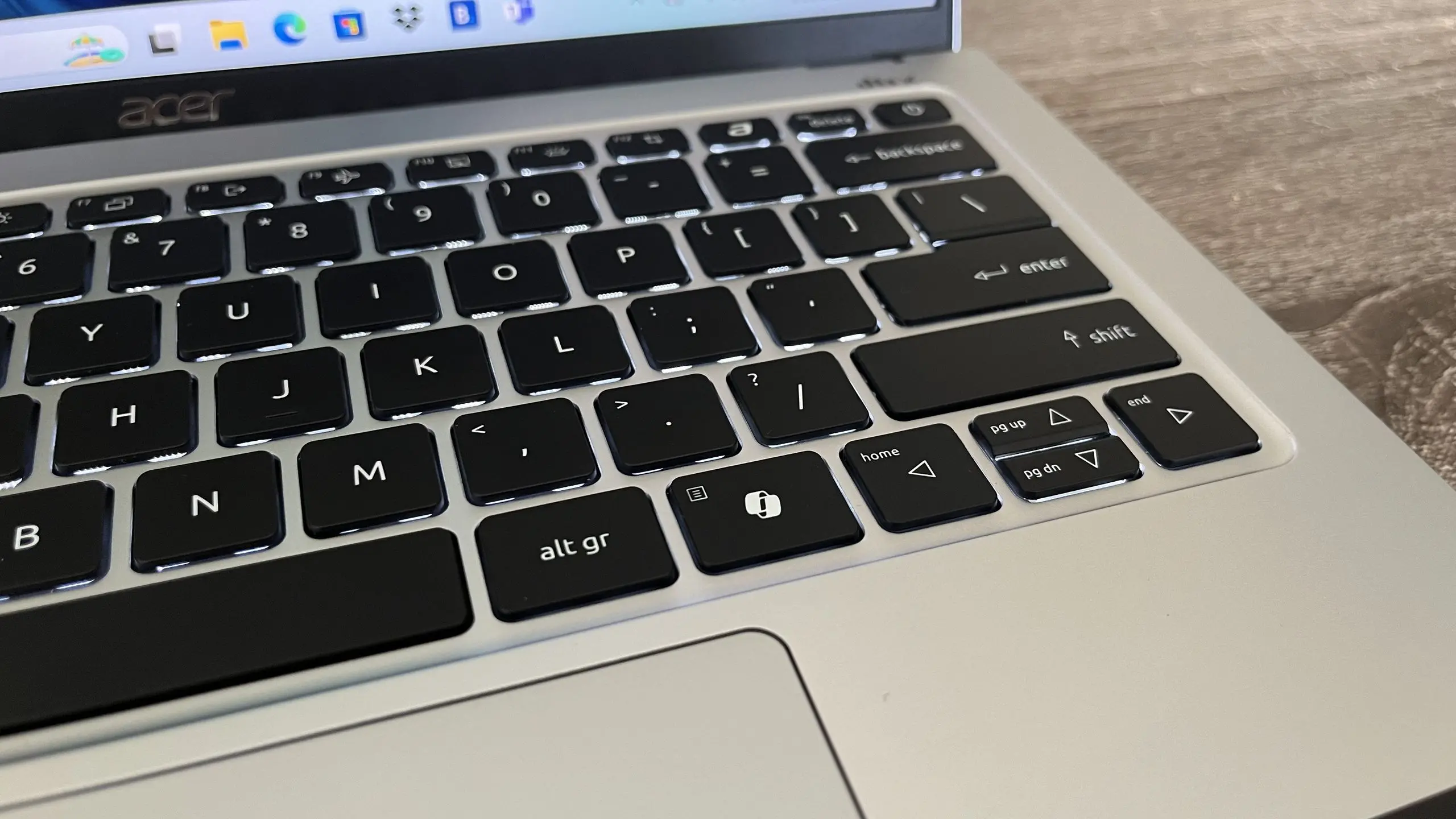
Microsoft has announced a significant update for Windows 11 that addresses one of the most common complaints since the introduction of the Copilot AI assistant. Users will soon be able to remap the dedicated Copilot key on their keyboards to launch any application or execute a command of their choice. This change effectively restores the functionality that existed before the Copilot key was added, giving users full control over that physical button.
Background: The Copilot Key Controversy
When Microsoft introduced the Copilot key on new Windows 11 laptops and keyboards, it was seen as a bold move to integrate AI directly into the operating system. The key, located near the spacebar, was designed to launch Microsoft's AI-powered assistant Copilot with a single press. However, many users found it intrusive, especially those who rarely use AI tools or preferred to use third‑party assistants. The inability to remap the key forced users to either ignore it or find workarounds via third‑party software.
What the Update Changes
According to a post on the Windows Insider Blog, the upcoming update will allow users to customize the Copilot key via the Settings app. Under the Personalization section, a new option labeled "Copilot key" will appear, letting users choose from a list of installed apps or assign a custom command. Alternatively, users can set the key to do nothing, effectively disabling it. This change applies to all keyboards that include a dedicated Copilot key, including those from Microsoft's Surface lineup and partner devices like Dell, Lenovo, and HP.
How to Remap the Copilot Key
Once the update is installed, users can navigate to Settings > Personalization > Copilot key. There they will see a dropdown menu listing all applications that can be launched with a single press. Users can select any app, from Notepad to Adobe Photoshop, or even a custom script. The change takes effect immediately without requiring a restart. For those who want to restore the default behavior, simply selecting "Copilot" from the list reverts the key to its original function.
Impact on User Experience
This update addresses a major pain point for many Windows 11 users. The Copilot key, while intended to streamline access to AI features, often felt like an imposition. Power users and IT administrators in particular criticized the lack of customization. With the ability to remap, users can now tailor their keyboard to their workflow, whether that means launching a browser, a coding IDE, or a communication tool. The change also aligns with Microsoft's broader philosophy of offering more personalization options in Windows 11.
Broader Implications for AI Integration
Microsoft's decision to allow remapping does not signal a retreat from AI; rather, it indicates a more user‑centric approach. By giving users the choice, Microsoft hopes to reduce friction and encourage organic adoption of Copilot. This move also sets a precedent for how hardware keys linked to AI services could be handled in the future. Other operating systems may follow suit as AI assistants become more common. Additionally, the update shows that Microsoft is listening to feedback from its Insider community, where the demand for remapping was frequently voiced.
Rollout Timeline and Availability
The feature is currently in testing with Windows Insiders in the Dev Channel. Microsoft has not announced a specific date for public rollout, but it is expected to come as part of a cumulative update within the next few months. The change will be available on all editions of Windows 11, including Home, Pro, and Enterprise. Users who do not have a Copilot key on their keyboard will not see the option.
Technical Details and Limitations
While the update grants flexibility, there are some limitations. The remapping is limited to launching applications or executing system commands; it cannot be used as a modifier key or for complex macros without additional software. Additionally, the key cannot be remapped to launch web pages directly – users must first create a shortcut or choose an app that can open a URL. Microsoft has confirmed that the key will still be recognized by the system as a special key, so it will not interfere with other keyboard shortcuts.
How This Compares to Other Remapping Options
Previously, users had to rely on third‑party tools like AutoHotkey, PowerToys, or SharpKeys to remap the Copilot key. These solutions worked but required technical know‑how and sometimes caused conflicts with system updates. The native support simplifies the process and ensures stability. For the first time, the Copilot key behaves exactly like any other keyboard key in terms of customization. This parity is a win for users who have long demanded such functionality.
Reaction from the Community
Early reactions from Windows Insiders have been overwhelmingly positive. Many users appreciate that Microsoft finally addressed the issue after months of requests. Some power users, however, wish that the remapping options were more extensive, such as the ability to trigger system actions like opening the calculator or toggling dark mode. Nonetheless, the update is seen as a step in the right direction. The change also reassures users who were concerned that hardware keys would become locked to specific services without user consent.
In summary, Microsoft's decision to let users customize the Copilot key marks a mature evolution in its approach to AI integration. Rather than forcing the AI assistant upon everyone, the company is providing flexibility and respecting user choice. The update enhances the overall Windows 11 experience and demonstrates that user feedback can lead to meaningful changes. As the feature moves from insider testing to general availability, millions of users will soon have the freedom to decide what that dedicated key does on their keyboard.
Source: TechRadar News